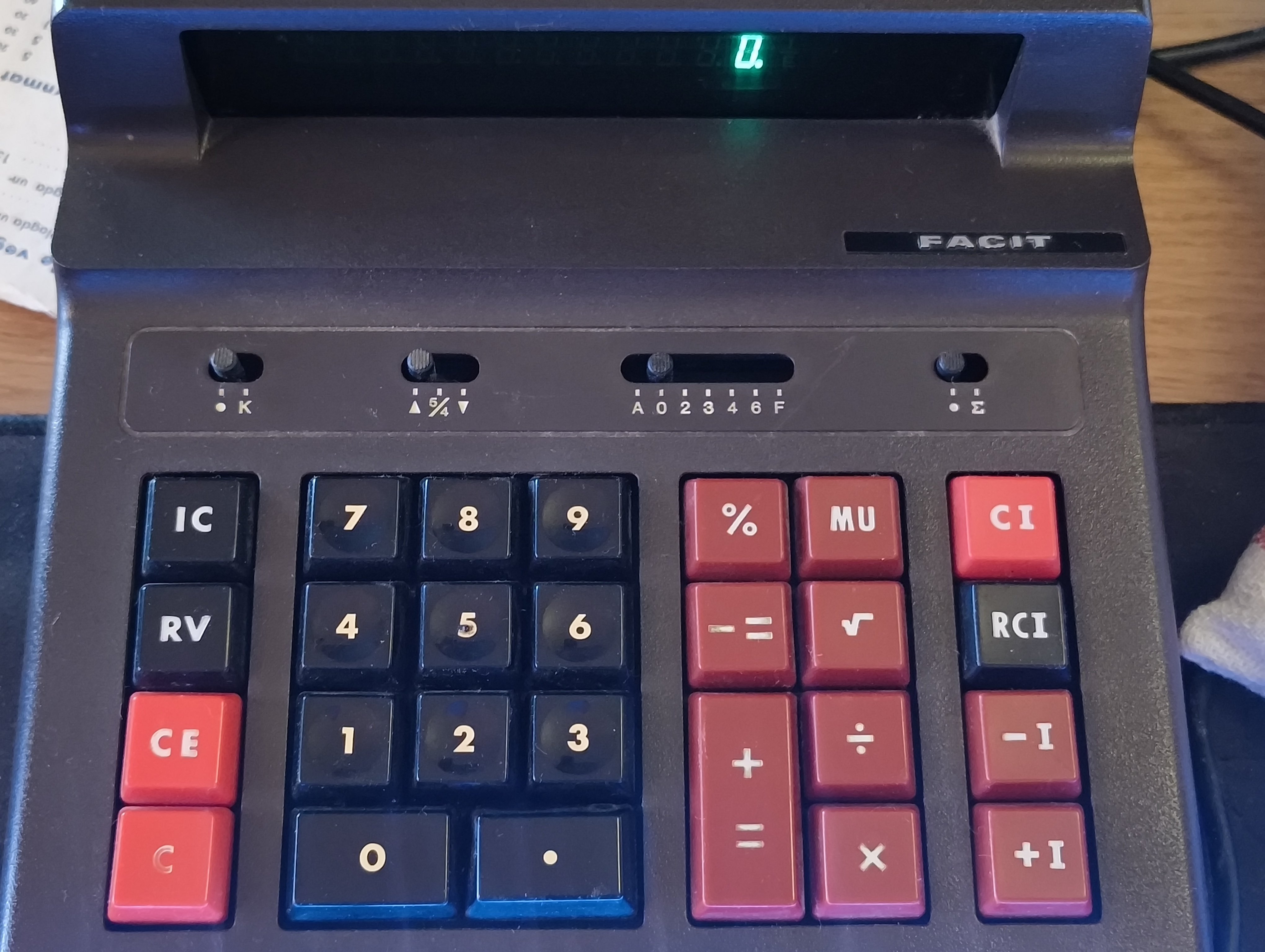
The first one lets you turn K on or off
K.
Damn, it worked.
Found some documentation listing the two middle switches as the rounding switch (up fraction down) and the decimal switch (auto? 0 to 6 then hex?). No idea on the other two.
http://www.calcuseum.com/SCRAPBOOK/BONUS/32853/1.htm
Decimal switch: [A-0-2-3-4-6-F], Round switch: [(ArrowUp)-5/4-(ArrowDown)], Miscellaneous switch: [(Blank)-K .-(Sigma)],
I see a lot of wrong info on the the decimal slider. This is how it works:
A is for “Add-mode”. This means that 2 decimals are always assumed. It’s used for adding a lot of 2 decimal numbers, because you’ll never have to press the decimal key. If you’ve ever worked a credit card terminal and having to enter 200 to get 2.00$, that’s how this setting works.
0-6 are fixed and rounded according to the rounding setting.
The decimal F is for floating. It’ll use the most relevant amount of decimals.
Another funny button is MU which is Mark Up. It’s used with the percentage button. It’s a backward ass way to do percentages. You’ll enter a value and then MU the percentage that you want from the result, instead of the input. Say you have product that costs 100 and you’ll want to mark it up, so you’ll get 20% of your new sales price as profit. Press 100 MU 20% and it should show 125, which is your sales price, because 25 is the 20% of 125. It doesn’t make sense to me why anyone ever needed that button.
Actually I found this site (in German) which says that the MU is for Impact Calculation. Which… I wouldn’t even begin to try to understand how I’d use.
According to that site, it also has an item counter. Normally this also on the print, but without a printer I guess it needs a button for that. Perhaps the IC button?
Remember that on desktop calculators the operations are entered reverse of ordinary pocket calculators. First you press the number and then you press the operation. So to do 100 - 50 you need to press “100 + 50 -”
Same for the MU. First you need a number to be added. Then MU some number as percentage and +=.
If I switch the power on, and press the IC key nothing happens. But I do, as far as I can see, any calculation and press IC I get a (to me) random number displayed on screen. So yeah, that might be the case but I’m not sure what items it is counting. The RV key seems to flip between different numbers.
Impact Calculation might just be a mistranslation. DeepL seems to think it should be mark-up. Following what you told me, I still get no result from operating the calculator with MU and %. Which is surprising me because it acts like those keys have no function.
I’ll write it in the order I press the keys and maybe you’ll figure out what I’m doing wrong.
Switch on > 100 > MU > 20 > % = 20
It displays 20 even if I press += after. The display does update, so it is registering the key presses at least.
¯\_(ツ)_/¯
edit: ok I think I figured it out. It’s MU > 100 > X > 20 > % > += > 120
It think you should try:
100 > + > MU > 20 > % > +=
It should show 125.
That shows 120.
Hmm. I guess different brands do this stuff differently. In real life I’d definitely prefer to break the equation into separate operations, just to ensure that I understand and can document the process.
I guess that’s why I don’t know what I’m looking at. I’ve not had great math teachers through my school time, and I don’t actually know what this is supposed to do. Like, in actual math steps.
I see that the result should be 125. Why ain’t it 120?
They seem to have some kind of function regarding how to perform or display calculations.
“What’s up with your calculator, bruh? It says 2+2 equals infinity.”
“Did you set it to F?”
“Yeah. What’s F mean?”
“It means it’s Fucked.”
No.
apology for poor english
when were you when svenska calculator post drop?
i was sat at home eating IKEA meatballs when notification ring
‘Calculator switch set to K’
‘no’
Thanks, I already know no. means number
The right-most switch lets you turn on sigma mode.
I would assume that’s summation mode, so everything you enter is treated as a running total. This looks like a business calculator.
Some guesses by ChatGPT:
Left Switch (“K” setting):
- K: Likely for a “constant mode,” where the calculator uses one operand as a constant for repeated >calculations (e.g., multiplying several numbers by the same value).
- The other position is likely “normal mode,” disabling this feature.
Middle Switch (“A/2/4/6” etc.):
- This could control decimal rounding or precision:
- “A” might stand for “automatic” mode.
- “0, 2, 3, 4, 6” refers to the number of decimal places displayed or used in calculations.
- “F” likely stands for “full precision,” using all available decimal places.
Right Switch (“Σ” setting):
- Σ: Likely enables a “summation mode,” where the calculator automatically adds results to a running total (useful for bookkeeping or repetitive additions).
- The other position disables this mode.
Being Swedish the “constant mode” seems likely as we often used k (for “konstant”) in school math to represent a constant (e.g. for the slope of a line).
Bold of you to mention chat gpt in a comment, I feel like any mention of it tends to get down voted to hell, even when it’s appropriately used as you did here
Those fucking things are great as tools to figure stuff out. Can’t trust them to be correct, but you can trust them to shoot the shit and dribble the ball to a destination which is unknowable to man
Yeah, people are really bad at nuance and context. Even something that is normally a shitty tool can have uses.
It seems to be right on the K switch. And yeah. Konstant makes sense.
The numbered switch seems to check out at least. Other than the F. F just gives me a single decimal. edit: no… Three…?
Not sure about the right switch. It adds an I in the upper right corner and it seems possible to flip between different calculation results. Maybe?
F is likely Floating point - so, just regular precision. Not sure what A would be, then