- cross-posted to:
- linux@lemmy.ml
- cross-posted to:
- linux@lemmy.ml
cross-posted from: https://lemmy.world/post/41518884
“Gimp is good but i miss the heal patch” …not really.
Resynthesize is a heal selection plugin you can add to Gimp. With many software store manager like the one from Linux Mint all you have to do is simply to add the additional components in the software page
Otherwise you can download it from github and add it to your plugin folder following this guide
https://www.arkthinker.com/edit-image/remove-the-watermark-with-gimp/
https://github.com/bootchk/resynthesizer
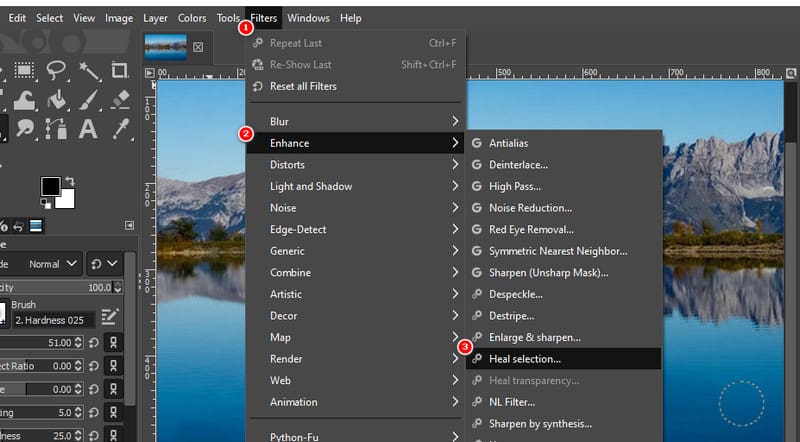
once installed you can find it in Filters> Enhance > Heal section


More Gimp plugins
https://beebom.com/best-gimp-plugins/
https://www.makeuseof.com/tag/install-gimp-plugins/
You must log in or register to comment.
Interesting.
That article is pretty spammy though. Thankfully I didn’t even enable javscript on it. And it isn’t really a guide either. The only thing you might need from it is this screenshot for finding the plug-in after installation.
Assuming you have gimp3.x and don’t want to go flatpak, you need to download this release, then run the following commands after unzipping:
cd resynthesizer-3.0/
meson setup resynthesizerBuild
cd resynthesizerBuild/
meson compile --verbose -j 12
meson install # asks for sudo privileges
Dependencies: just meson and - on distros that separate these - gimp’s devel libraries.
And then also add /usr/local/lib/x86_64-linux-gnu/gimp/3.0/plug-ins/ (take it from the meson install output) to your plugin paths in Gimp=>Preferences.
Performance examples.
Easy:

(Ignore the pixelated square)Tricky:

What is meson?
alternative to other build systems like Make or CMake
Thank you! I can’t keep up. Everytime I blink it seems another of these appears. Is this something that will become the norm? Will it replace make cake? Or why is it used?