
It is another problem. I did say what God says is for OUR life, for US, not himself.

Reza Hosseinzadeh
Searching for the fact.
- 7 Posts
- 21 Comments
Joined 3 years ago
Cake day: June 26th, 2023
You are not logged in. If you use a Fediverse account that is able to follow users, you can follow this user.
The religion tells us what does God say about our living. God says the right way to live is this; the way is best for US and God does not need us to live in the way.
It doesn’t matter for GOD what we do, it is important for us. The rules of the religion is for OUR life not GOD’s.
 1·7 months ago
After updating
freedesktop.Platformwith flathub the problem has been solved.
 1·1 year ago
I did clean flash and wipe all of my data, but the problem exists! I went through this guide.
Encryption is disabled in the settings.
Thanks! I wasted your time. As you said the problem caused a headache to me. I stop trying on it for some days.
Thank you for spending your time. Yes,
resolvectl status’s output is like yours inGlobalpart, but in the end of the output there is this:Link 3 (wlp3s0) Current Scopes: DNS LLMNR/IPv4 LLMNR/IPv6 mDNS/IPv4 mDNS/IPv6 Protocols: +DefaultRoute +LLMNR +mDNS -DNSOverTLS DNSSEC=no/unsupported Current DNS Server: 192.168.1.1 DNS Servers: 192.168.1.1 Default Route: yesAs you see,
wlp3s0uses the default ISP DNS. Wireshark’s output confirms this.
I ran the command with
sudoand got the error. I created the file withsudoeditand added the contents in it andsystemctl reload systemd-resolved. But the DNS requests are sent with port53to the default DNS server yet and:cat /etc/resolv.conf # This is /run/systemd/resolve/resolv.conf managed by man:systemd-resolved(8). # Do not edit. # # This file might be symlinked as /etc/resolv.conf. If you're looking at # /etc/resolv.conf and seeing this text, you have followed the symlink. # # This is a dynamic resolv.conf file for connecting local clients directly to # all known uplink DNS servers. This file lists all configured search domains. # # Third party programs should typically not access this file directly, but only # through the symlink at /etc/resolv.conf. To manage man:resolv.conf(5) in a # different way, replace this symlink by a static file or a different symlink. # # See man:systemd-resolved.service(8) for details about the supported modes of # operation for /etc/resolv.conf. nameserver 127.0.0.1 nameserver 192.168.1.1 search .
install -o0 -g0 -m644 <(cat <<EOF [Resolve] DNS=127.0.0.1:9053 EOF ) /etc/systemd/resolved.conf.d/90-dns_port.conf
The output is an error:
install: cannot stat '/dev/fd/63': No such file or directory.
 1·1 year ago
I solved it! In
Pulse audio volume controlapp I changed the output of LW toBuilt-in Audio Analog Streo.
Are your tabs starting muted?
No.
Try to uncheck the autoplay option in site permissions to check if this causes it.
I did it, but the problem still exists.
I couldn’t find such thing in permissions’ part.
I set them to
trueinabout:config, but the problem still exists.
You are right, but is there a way to solve this. Now I’m using foxyproxy in LW for this reason, but it would be better to solve the problem and use the whole system proxy.
deleted by creator
It didn’t work.
These are qv2ray’s filesystem permission section in flatseal:
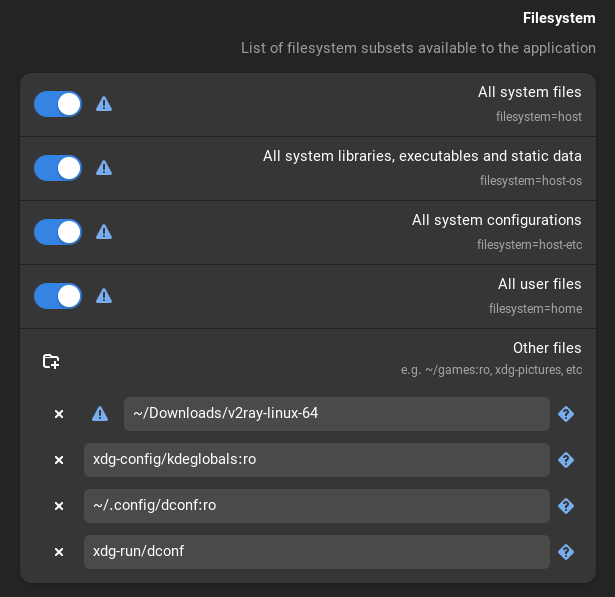
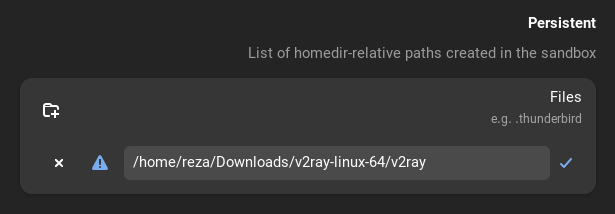
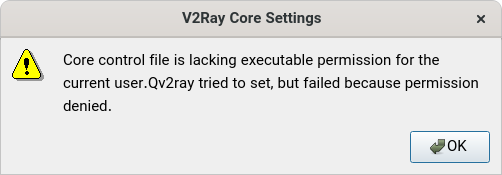
In my opinion there shouldn’t be any permission problem. I run the app with user and as the permissions I mentioned, user has access to execute it.
Yes, it is a binary file.


The life should be with love not things you said, love of God. I think you have understood religion wrong; you think the religion is like a cruel dictator which punishes you if you do something wrong in its opinion. The religion is “I do this because I love God”. If I do something God told me to do, my life will get better; not only my “life”, even my after life. I think I cannot describe better in comments of a lemmy post. This is something we should talk about in a physical meeting.